5 Social Media Moderation Tools for High-Volume Teams
Compare five social media moderation tools by workflow, channel focus, team needs, and customer-conversation fit, plus a practical evaluation test.
Updated August 26, 2026

The right social media moderation tool depends on what should happen after it finds a comment. Choose Brandwise when comments and DMs are ecommerce support or buying conversations; CommentGuard for focused Facebook and Instagram moderation; NapoleonCat for rule-based moderation inside a broader social suite; Agorapulse for a broad social inbox and publishing workflow; or BrandBastion for moderation-first brand protection across major networks.
There is no universal winner. A tool that quickly hides spam may still fail if it misses product questions, cannot assign a customer complaint, or gives a multi-brand team no safe review process. Start with the operating problem, then compare the two products that fit it.
This guide was substantively updated on August 26, 2026. Platform coverage and product packaging change, so verify every required account, message type, and action with the provider before buying.
Social media moderation tools at a glance
| Tool | Best fit | What it is built to handle | Important boundary to verify |
|---|---|---|---|
| Brandwise | Ecommerce teams treating comments and DMs as support or revenue conversations | Paid and organic comment moderation, replies, DMs, bulk work, recurring question and complaint discovery, team analytics, and Shopify context | It is not a publishing-first suite or outsourced moderation service |
| CommentGuard | Teams concentrated on Facebook and Instagram posts and ads | A focused inbox, filters, bulk actions, moderation, replies, team access, and analytics | Confirm whether a Meta-centered product covers every network your team needs |
| NapoleonCat | Social teams wanting rules plus inbox, publishing, and analytics | Rule-based moderation actions across several supported social networks and message types | Available triggers and actions vary by platform |
| Agorapulse | Teams wanting a broad social management suite | Paid and organic inbox work, assignment, labels, bulk actions, publishing, and reporting | Moderation is one part of a larger suite, so confirm its depth for your highest-volume queue |
| BrandBastion | Brands centered on brand safety across paid and organic social content | Moderation across major platforms, risk categories, and a transparency dashboard | Confirm the service model, workflow ownership, and customer-response depth for your program |
The table is a shortlist, not a ranking. If none of the best-fit descriptions matches your workload, define the problem more precisely before scheduling demos.
Decide what the tool must do after it detects a comment
Native filters are a useful baseline. They can block words, hide obvious abuse, and reduce some manual review. They become limiting when a team repeatedly checks several pages or accounts, handles paid and organic comments separately, or needs to distinguish harmful content from a real customer problem.
Before comparing products, write down the action you expect for each common comment:
- Obvious spam or a scam: hide, delete, block, or escalate according to policy.
- A legitimate complaint: keep visible when appropriate, assign an owner, and respond accurately.
- A product or shipping question: answer, move private if personal details are needed, and preserve the context.
- An ambiguous negative comment: draft, label, or send for human review instead of taking an irreversible action.
- A sudden volume spike: apply the same policy across affected posts while surfacing patterns to the team.
This distinction matters because classification is only the first step. The useful outcome is not “the system called this negative.” It is that the right comment received the right action, the team can understand what happened, and a person can intervene when judgment is required.
For a durable policy behind those actions, use the social media comment moderation playbook. If paid ads create most of the volume, the Facebook and Instagram ad-comment moderation guide covers the automation workflow in more detail.
1. Brandwise: best for ecommerce conversations and moderation
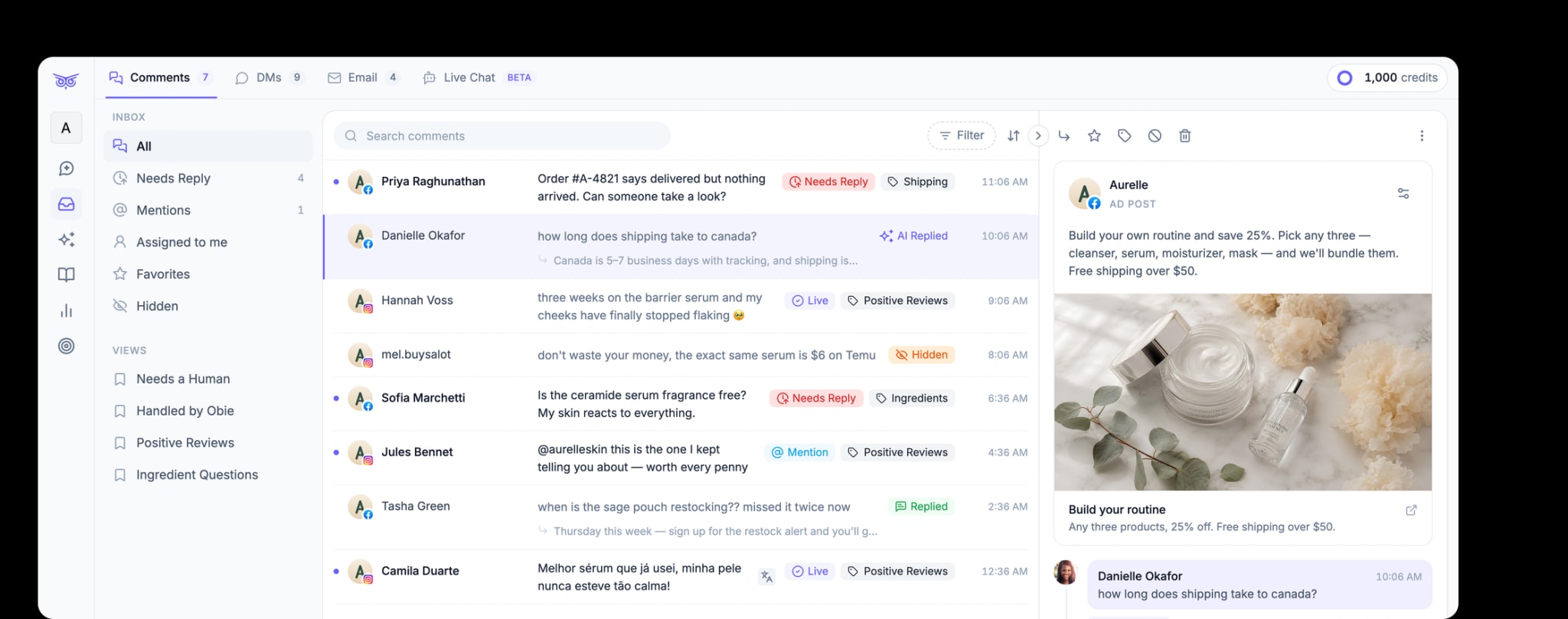
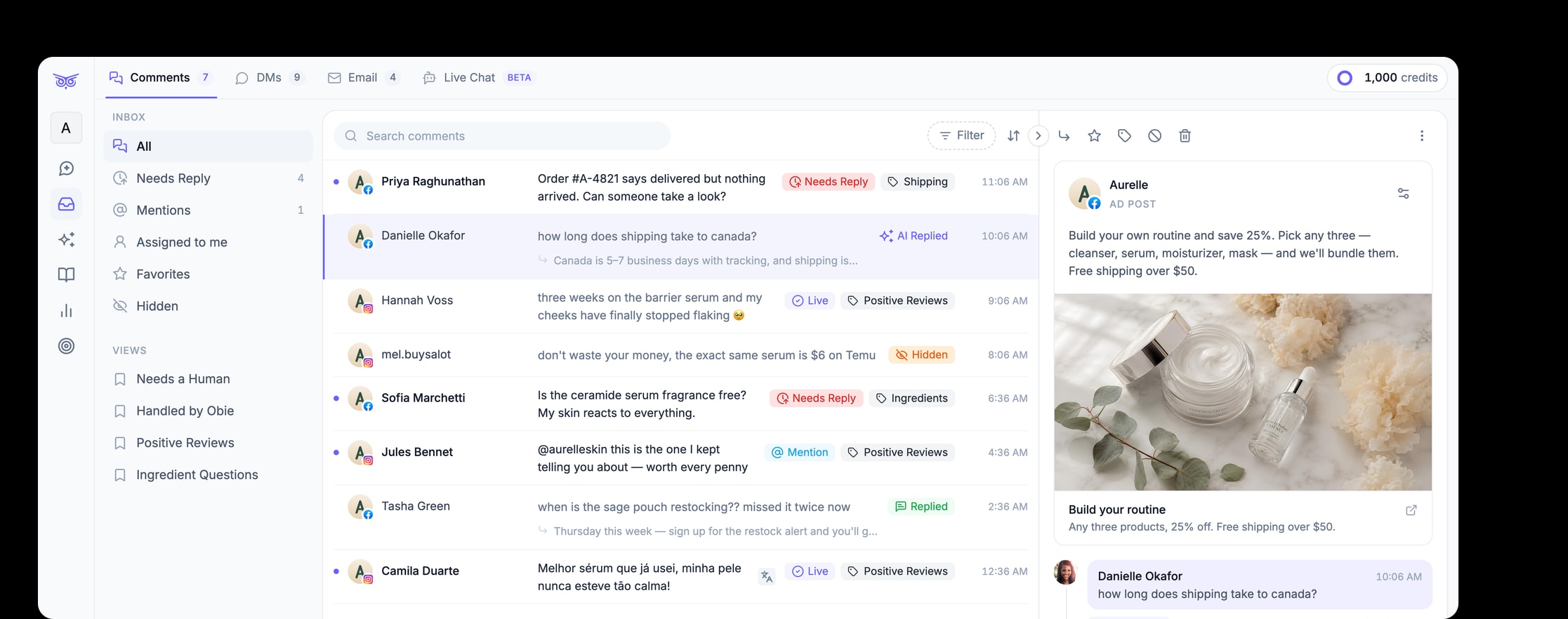
Brandwise is the strongest fit when the moderation queue is also a customer-service or sales queue. Its public social media product supports moderation on paid and organic posts, responses to engagement, and direct-message management across supported social channels.
The difference is what the team can do with the conversation. Brandwise can help teams hide spam or harmful comments, respond using approved brand context, work comments and DMs in bulk, review team activity, and identify recurring questions or complaints. It also supports Shopify order context in the DM workflow. People can remain involved for complex, sensitive, or policy-driven cases.
That operating model fits an established ecommerce brand or agency when comment volume includes questions such as “Does this fit?”, “Where is my order?”, or “Can someone help me?” Removing unwanted comments is necessary, but resolving legitimate conversations is where the workflow creates customer value.
Choose Brandwise when: comments and DMs are recurring support or buying conversations; paid-social protection matters; several teammates need a controlled workflow; or ecommerce context should inform the next action.
Keep looking when: the primary requirement is a content calendar, a broad listening suite, or a fully outsourced moderation team.
2. CommentGuard: best for focused Facebook and Instagram work
CommentGuard centers on Facebook and Instagram posts, ads, comments, and DMs. Its current product page lists a unified inbox, filters, bulk actions, automated moderation, saved and automated replies, team access, page-scoped permissions, and analytics.
That focus can be an advantage for a team whose workload is concentrated on Meta. The buying test can stay close to the actual problem: how the product handles organic and ad comments, how quickly teammates can review a queue, which actions can be automated, and whether account permissions match the way an agency or portfolio team works.
The same focus is also the main boundary. A Meta-centered tool may leave TikTok, YouTube, reviews, email, or broader customer context in another system. Include those handoffs in the operating cost rather than comparing only the moderation screen.
Choose CommentGuard when: Facebook and Instagram generate a clear majority of the moderation workload and a focused tool is preferable to a large social suite.
Keep looking when: customer resolution, ecommerce context, or broad cross-network work is the main requirement.
3. NapoleonCat: best for rules in a broader social suite
NapoleonCat's Auto-moderation uses configurable rules for supported actions such as replying, hiding, deleting, blocking, assigning, tagging, and notifying. Its current page describes coverage across Facebook and Instagram posts and ads, direct messages, TikTok, LinkedIn, and YouTube, with actions varying by platform.
NapoleonCat also combines moderation with a social inbox, publishing, analytics, and reporting. This makes it a credible candidate for an internal social team that wants one application for daily channel operations and prefers explicit rule-based automation.
Do not evaluate only whether a rule exists. Recreate an innocent comment containing a blocked word, a genuine complaint, a question that needs assignment, and a high-risk case that must not receive an automatic public reply. Check trigger priority, audit history, reversal, and the action available on each network.
Choose NapoleonCat when: the team wants self-operated rules, inbox work, publishing, and reporting in a broader social media tool.
Keep looking when: ecommerce customer resolution or a specialist brand-safety program is the dominant need.
4. Agorapulse: best for a broad social inbox workflow
Agorapulse's Social Media Inbox brings paid and organic conversations into one workspace. Its current page describes assignment, labels, filtering, bulk actions, saved replies, moderation rules, and ad-comment management across supported networks, alongside the company's publishing and reporting products.
This model fits a social team whose main problem is coordinating broad day-to-day engagement. It can reduce tab switching and give teammates a common queue without making moderation the only reason to buy the platform.
That breadth deserves a practical test. Confirm whether the inbox includes the exact ad accounts, message types, private conversations, review paths, and automation actions that create your workload. A broad suite can look complete in a feature grid while treating a critical comment type as a secondary workflow.
Choose Agorapulse when: publishing, reporting, and a shared social inbox all need substantial coverage in one suite.
Keep looking when: comment moderation and ecommerce resolution drive most of the value. For a wider replacement analysis, compare the Agorapulse alternatives by workflow.
5. BrandBastion: best for moderation-first brand protection
BrandBastion's content moderation page describes moderation across major social platforms and both organic and paid content. It organizes risk across multiple categories and gives teams a transparency dashboard for reviewing moderation activity.
That makes BrandBastion a candidate when brand protection is the center of the program: a large paid-social footprint, sensitive campaigns, several markets, or a substantial harmful-content workload. The evaluation should determine who configures policy, who reviews uncertain cases, how actions are explained, and what happens to legitimate service questions that appear in the same queue.
The last question is important. A brand-safety workflow and a customer-resolution workflow can touch the same comment but optimize for different outcomes. Confirm whether the product, service arrangement, or second system covers the response and ownership steps your team needs.
Choose BrandBastion when: moderation across major paid and organic social surfaces is the primary operating problem and transparency into actions is important.
Keep looking when: a focused ecommerce conversation workflow or broad publishing suite better matches the work. Teams already evaluating it can use the BrandBastion alternatives comparison.
How to test the final two tools
A demo can prove that a product has an inbox. It cannot prove that the inbox will make the right decisions in your environment. Run the same short evaluation in both finalists.
1. Build a representative moderation pack
Use sanitized examples from a normal week: obvious spam, a scam link, legitimate criticism, a product question, an order issue, a multilingual comment, an ad comment, and an ambiguous joke. Add one sensitive case that must route to a person without an automated public response.
For each example, define the expected action before testing: leave, reply, draft, move private, label, assign, hide, delete, block, report, or escalate.
2. Test the exception path
Ask what happens when the system is uncertain, two teammates open the same conversation, a platform connection needs attention, or a legitimate comment is hidden incorrectly. Verify that the exception is visible and that a person can correct the action.
3. Test the real account structure
Connect or recreate the number of pages, brands, ad accounts, and teammates you actually manage. Give an agency reviewer, brand owner, and frontline teammate the access they would have in production. Confirm that each person can see and change exactly what the workflow allows.
4. Measure customer and policy outcomes
Do not use “comments removed” as the only success metric. Track harmful content handled within policy, legitimate comments preserved, customer questions resolved, conversations routed correctly, false positives, incorrect replies, and time spent on review.
5. Calculate the whole operating cost
Include software, usage, seats, setup, policy maintenance, internal review, managed-service hours, and any second tool still required. The lowest subscription price can create the most manual work if the operating model does not fit.
Which social media moderation tool should you choose?
Choose by the workflow that creates the most risk or repeated work:
- Brandwise for ecommerce comments and DMs that need moderation, customer resolution, team control, and connected commerce context.
- CommentGuard for focused Facebook and Instagram comment management.
- NapoleonCat for rule-based moderation inside a broad, self-operated social suite.
- Agorapulse for publishing, reporting, and a shared social inbox.
- BrandBastion for moderation-first brand protection across major social networks.
If comments and DMs have become customer-service or buying conversations, see how Brandwise manages social engagement. Then use the representative moderation pack above to test whether it can reduce repetitive work while keeping people in control of sensitive cases.