How to Automate Facebook and Instagram Ad Comment Moderation
Learn where Meta's native inbox stops scaling and how AI can moderate ad comments, answer shoppers, manage DMs, and escalate sensitive cases.

The practical way to automate Facebook ad comments—and Instagram ad comments—is to let AI handle the repetitive work as comments arrive: identify spam or harmful content, answer clear customer questions, move private conversations to direct messages, and send sensitive or uncertain cases to a person. Meta's native tools provide account access and basic controls, but a growing ecommerce brand should not depend on someone repeatedly checking an inbox and making every decision by hand.
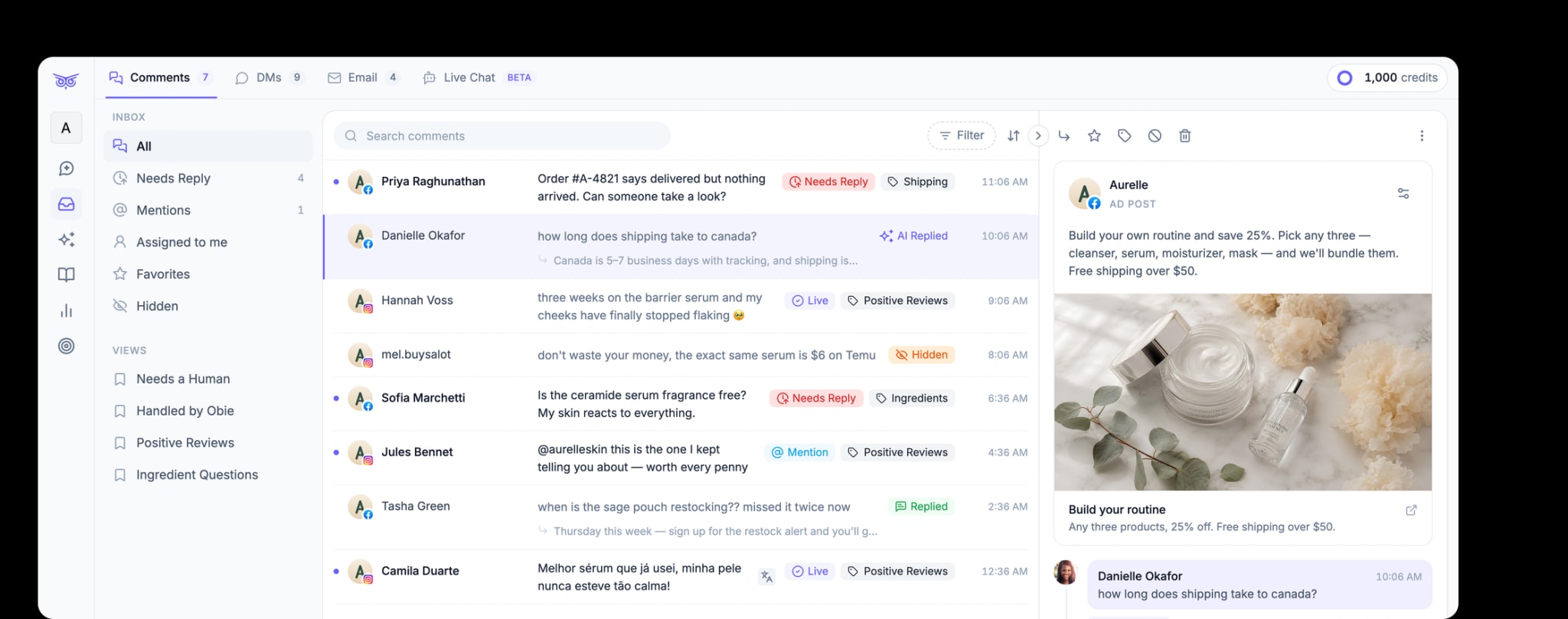
Brandwise social media management is built for that automated workflow. Its AI agent, Obie, can moderate paid and organic social comments, respond to engagement, manage direct messages, and help teams identify recurring questions or complaints while people stay involved where judgment matters.
This guide explains what to automate, where Meta's built-in tools still help, and how to move from manual checking to a more scalable system without giving up control.
Meta's inbox is a starting point, not the whole moderation system
Meta Business Suite Inbox brings supported Facebook and Instagram comments and messages into one place. Meta also provides visibility controls: Facebook distinguishes between hiding and deleting Page comments, while Instagram's Hidden Words can filter certain unwanted comments and message requests.
Those tools can be enough when comment volume is low and one person knows every active campaign. They become harder to rely on as the brand adds more ads, products, markets, and coverage hours.
A manual inbox still requires someone to:
- keep checking for new comments;
- decide what is spam, criticism, a buying question, or a support issue;
- find the correct product, promotion, shipping, or returns information;
- write or approve a response;
- move private cases into direct messages;
- remember which comments need follow-up; and
- notice when the same question or complaint keeps appearing.
Meta's native controls remain useful, especially for account access and platform-specific actions. But they should be the foundation beneath the workflow—not the daily operating model for a growing team.
How to know when manual moderation has stopped scaling
The clearest sign is not simply “too many comments.” It is that valuable customer conversations are becoming difficult to separate from repetitive work.
Manual moderation is likely holding the team back when:
- buyer questions sit unanswered because the queue is filled with spam;
- comments arrive outside normal coverage hours;
- the same basic product questions require nearly identical replies;
- different team members apply hide and reply rules inconsistently;
- order-specific issues stay public longer than they should;
- comments on paid and organic posts are managed as separate jobs; or
- repeated objections never make it back to the people improving ads and product pages.
Paid ads make this especially important. They often reach people encountering the brand for the first time, so a comment thread can function like a public pre-purchase support channel. A useful answer may help the original commenter and every shopper reading the thread. A delayed, incorrect, or missing answer can leave the ad's most important objection unresolved.
If the team is spending most of its time finding comments and repeating familiar decisions, automation should take over that routine layer.
What automated ad comment moderation should do
Good automation does more than hide negative words. It should understand the kind of conversation taking place and choose a suitable next step within the rules your team sets.
| Comment situation | Automated first step | When a person should step in |
|---|---|---|
| Repetitive spam, scams, or clearly harmful content | Apply the approved visibility action | The pattern is new, ambiguous, or could affect account safety |
| Clear product, shipping, or policy question | Reply using current brand information | The available information conflicts or does not answer the question |
| Order-specific problem | Acknowledge the customer and continue privately in DM | Compensation, a disputed policy, or sensitive personal information is involved |
| Civil criticism or a negative product experience | Keep the comment visible and respond when a useful answer exists | The facts are disputed or the customer is highly distressed |
| Threat, safety allegation, legal issue, or unusual claim | Pause the routine action and escalate with context | Always—these cases need the appropriate owner |
| Recurring question or complaint across ads | Surface the pattern for the team | The team decides whether to update the ad, product page, policy, or product |
This approach avoids two common mistakes. The first is treating any negative sentiment as spam. A frustrated customer may have a legitimate issue, while a friendly-looking “collaboration” comment may be fraudulent. The second is automating replies without reliable brand context, which can produce a polished but incorrect answer.
The goal is not to remove people from customer conversations. It is to stop making people perform the same low-risk checks all day.
How Brandwise automates the repetitive work
Brandwise is an AI-agent platform for online and direct-to-consumer brands. Its AI agent, Obie, helps teams manage social engagement using their product information, policies, brand guidelines, prior conversations, and approved ways of working.
For social teams, that means Brandwise can:
- monitor and moderate comments on paid and organic social posts;
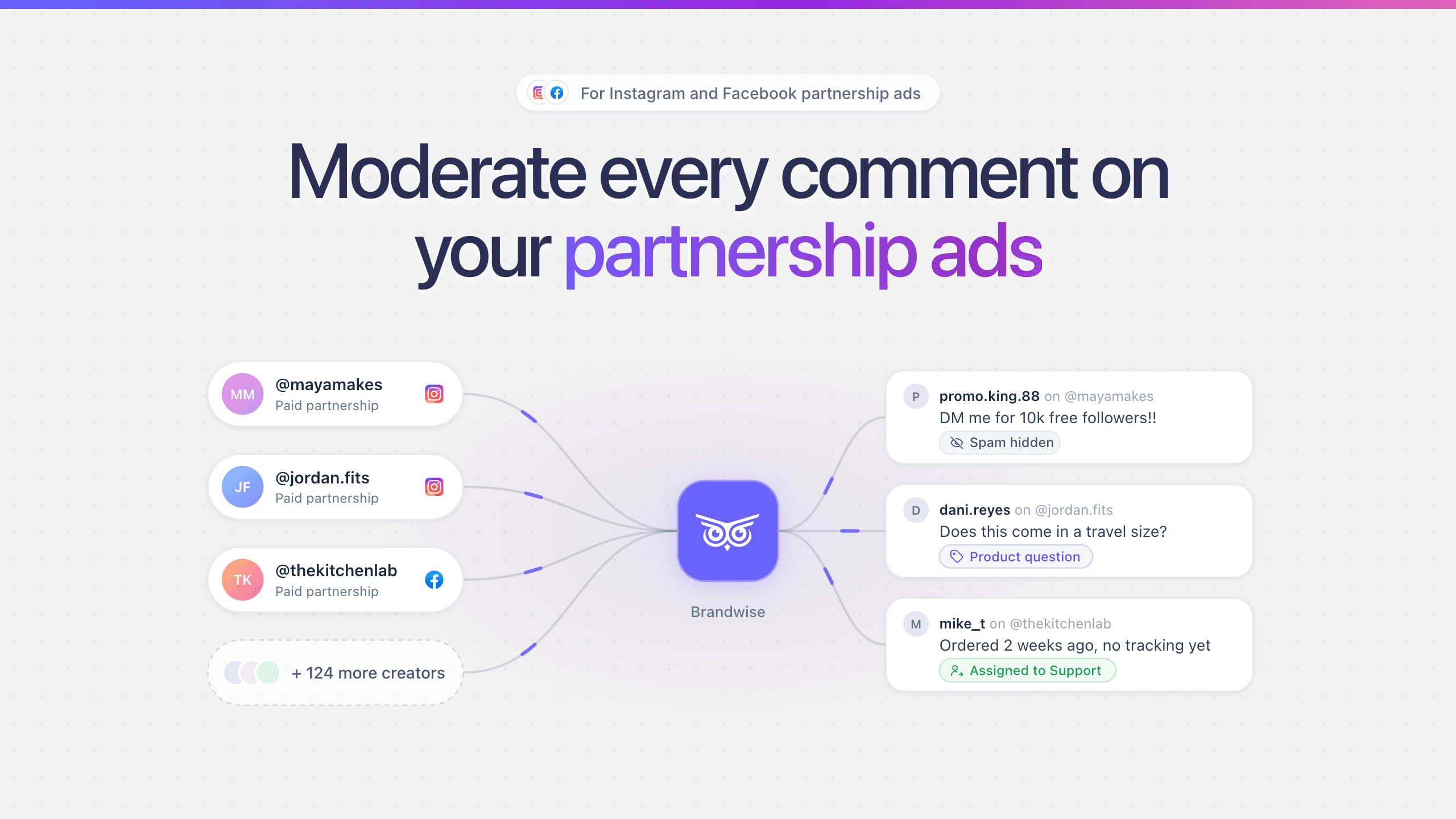
- moderate comments on partnership ads that run from creators' accounts, which never reach the brand's own Page or inbox (see how to manage comments on partnership ads);
- identify and hide spam, harmful, or off-brand comments according to the team's standards;
- respond to clear comments using relevant brand context;
- manage and respond to customer conversations in DMs using relevant context;
- keep people involved for sensitive, complex, urgent, or policy-driven cases; and
- help teams find frequently asked questions and recurring complaints in ad comments by asking Obie.
The difference is operational. Instead of asking a person to discover every new comment, classify it, search for an answer, and take the next action, the routine work can happen automatically. The team reviews exceptions, improves the guidance Obie uses, and acts on the patterns emerging across conversations.
That last step matters. Ten people asking the same question under an ad may signal that the creative or landing page is unclear. Repeated complaints may expose an expectation the campaign creates but the product does not meet. Brandwise helps turn those comments into something the broader business can use, rather than leaving them buried in an inbox.
Move from manual checking to automation without losing control
You do not need to automate every decision on day one. Start with one active campaign or a predictable category of comments, then expand as the team confirms that the behavior matches its standards.
1. Connect the accounts the team actually manages
Confirm that the appropriate Facebook Pages, Instagram accounts, and permissions are connected. Meta's account-connection guidance explains that people with the appropriate Page access can manage comments on ads from a connected Instagram account.
This is also a good moment to check which ads are active. Meta's Ad Library can show ads currently running across Meta products, including ads a team member may not personally receive. Meta also documents how to view a Page's active ads directly.
2. Define the outcomes, not just a list of banned words
Write down what should happen to the main categories your brand receives. For example:
- obvious spam is hidden;
- a common product question receives an approved answer;
- an order question moves to DM;
- legitimate criticism remains visible;
- a safety concern goes directly to a person; and
- an uncertain case waits for review.
Keep the policy narrow enough that the team can explain why each action exists. Keyword filters can help, but context and intent matter more than one word in isolation. For a deeper policy framework, see the social media comment moderation guide.
3. Give the system current brand information
Make sure product details, promotion terms, shipping guidance, return policies, and escalation instructions are accurate before relying on automated replies. An old answer delivered quickly is still an old answer.
For campaigns with several offers or creative variations, include enough information to keep replies consistent with what shoppers actually see. If an ad and landing page disagree, the system should not invent an explanation. That is an exception for the campaign owner to resolve.
4. Automate the routine categories first
Begin with high-confidence, repeated situations: known spam patterns, frequently asked product questions, public-to-DM handoffs, and routing to the right person. Review the early results and correct any unclear guidance.
Then expand coverage across more campaigns and comment types. The right pace is the one that removes repetitive checking while preserving clear human ownership for exceptions.
5. Review exceptions and patterns—not every comment
Once the system is running, the team's daily job changes. People should focus on conversations that require judgment and on the insights that improve future work.
That can include:
- approving an answer when two policies conflict;
- resolving a highly sensitive customer situation;
- investigating a new scam pattern;
- correcting a confusing offer or product claim; and
- turning repeated questions into clearer creative, FAQs, or product pages.
This is a more valuable use of the team's time than repeatedly opening Meta's inbox to look for routine comments.
Keep people responsible for the exceptions
Automation should have clear boundaries. A person should remain involved when a comment involves safety, legal risk, threats, disputed facts, compensation, unusual account behavior, or a decision that could materially affect the customer.
Legitimate criticism also deserves care. Facebook's Page comment guidance notes that hiding and deleting are different actions; a manually hidden comment can remain visible to its author and the author's friends. Removing criticism by default can conceal useful feedback and make a customer more frustrated.
A good system does not use “positive” and “negative” as substitutes for “safe” and “unsafe.” It handles obvious cases consistently, preserves useful public conversation, and makes the uncertain cases easy for the right person to review.
Measure the value beyond comments removed
Hide counts alone can reward the wrong behavior. Measure whether automation is making customer conversations faster, more accurate, and more useful.
Useful signals include:
- unanswered buyer questions;
- time to a useful response for common questions;
- customer issues successfully moved from a public thread to DM;
- false hides or actions the team reverses;
- exceptions that reach the correct owner;
- recurring questions that lead to a clearer ad or product page; and
- comments that reveal a new support or product issue.
Do not assume that moderation alone caused a change in ad performance without a controlled analysis. The immediate win is simpler to verify: fewer valuable comments are missed, repetitive work happens automatically, and people spend their time on conversations and insights that genuinely need them.
Meta's native inbox can help a team see and manage comments. Brandwise turns that access into an automated operating system for moderation, replies, and direct messages, while giving teams a way to ask Obie what questions and complaints keep appearing. Start with one campaign, define the boundaries, and let automation earn broader responsibility from there.