 For social adsFor Facebook, Instagram and TikTok
Moderate Facebook and Instagram
ad comments with AI
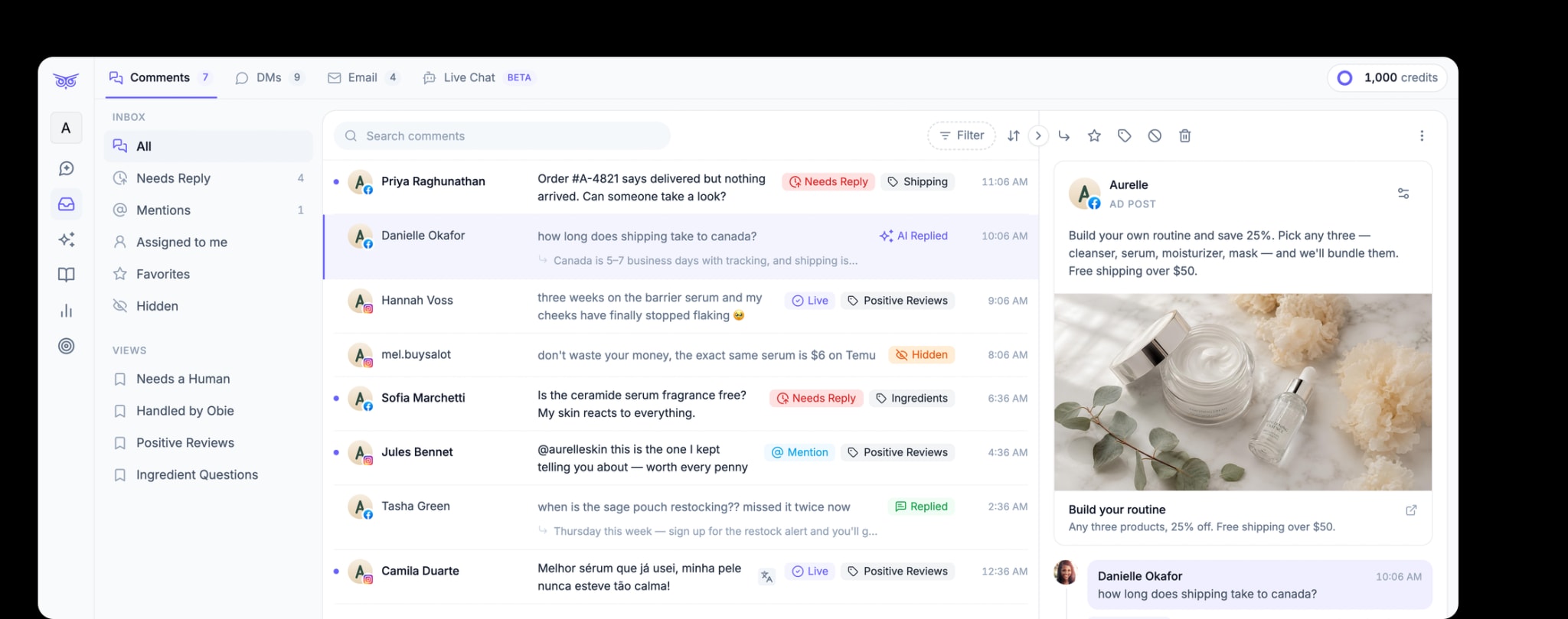
Brandwise hides spam, scams and hate on your ads in real time, and sends real questions to one inbox for your team or AI to answer


What gets hidden
What does Brandwise hide on your ads?
AI Moderation reads each comment for meaning, not just keywords. It hides what hurts your ads and leaves up the comments that help them sell
Hidden automatically
- Spam, bots, and scam links
- Hate, harassment, and abuse
- Negative comments about your brand or product
- Competitor promotion
- Any phrase on your Keyword Blacklist
Left up for your team
- Product, sizing, and shipping questions
- Buyers asking about price or a discount
- Praise and reviews
- Friends tagging friends
- Short positive reactions
Coverage
Which ads does Brandwise moderate?
Brandwise works through Meta’s and TikTok’s official APIs. Connect an account once and every new comment on it is checked
FacebookAds, dark posts, and organic postsHide, delete, reply, or reply by DMInstagramAds, dark posts, and organic postsHide, delete, reply, or reply by DMPartnership adsAds that run from a creator’s handle. How it worksHide or delete, and reply from your own Facebook PageTikTokOrganic posts and Spark AdsHide or replyHow it works
How does AI ad comment moderation work?
Connect your accounts
Connect your Facebook Pages, Instagram accounts, and TikTok accounts. Every plan includes unlimited pages
Turn on AI Moderation
Switch it on for each page. Pick Only on ads to leave organic posts alone, or Delete instead of hiding on Facebook and Instagram
Comments are handled as they arrive
Spam and abuse are hidden in real time. Questions are flagged Needs Reply for your team or AI
Can you set your own moderation rules?
Yes. Describe what you want hidden in plain words, like “comments that promote another brand,” and Brandwise takes care of it. You can also block specific words and phrases
Start Free Trial
Where do comments that need a person go?
Into one inbox for every page and platform. Comments that need an answer are flagged Needs Reply, so your team always knows what’s left
Start Free TrialCan AI reply to ad comments too?
Yes. AI answers questions in your brand’s voice using your knowledge base. Let it reply on its own, or review each reply before it goes out
Start Free TrialPricing
How much does ad comment moderation cost?
Plans start at $49 a month for 3,000 Credits. Each comment AI Moderation checks uses 1 Credit.
Trusted by DTC brands







Compare
Brandwise vs. Meta’s built-in tools
Hidden Words and Facebook’s keyword filters hide comments that match words you list. Brandwise reads each comment for meaning, across Facebook, Instagram, and TikTok
Common questions
Ad comment moderation questions
Does Brandwise moderate comments on dark posts?

Yes. Brandwise moderates comments on Facebook and Instagram ads, including dark posts that never appear on your Page's feed. The Facebook profile you connect needs access to the ad account that runs the ads.
Can Brandwise moderate TikTok ad comments?
Partly. Brandwise moderates comments on your connected TikTok account's videos, including Spark Ads that boost your own posts, because those comments land on the original post. It doesn't yet cover TikTok ads that run under a custom identity, or Spark Ads that boost a creator's post.
How fast are ad comments hidden?
In real time, as soon as Facebook, Instagram, or TikTok sends Brandwise the comment. If a comment is ever hidden by mistake, you can unhide it from the inbox in one click.
Will Brandwise hide real customer questions?
Questions, praise, and comments tagging a friend stay up. AI Moderation flags questions as Needs Reply so your team or AI can answer them. If a comment is ever hidden by mistake, unhide it from the inbox.
Does the commenter know their comment was hidden?
Usually not. A hidden comment disappears for the public, but the person who wrote it can still see it, and on Facebook so can their friends. On Facebook and Instagram you can delete comments instead.
How much does ad comment moderation cost?
Plans start at $49 a month for 3,000 Credits. AI Moderation uses 1 Credit per comment it checks, and each AI reply uses 1 Credit. Every plan includes unlimited team members and unlimited pages, and starts with a 7-day free trial.
Guides
Learn more about moderating ad comments
How to automate Facebook and Instagram ad comment moderation
Where Meta's native inbox stops scaling, and how to moderate ad comments, answer shoppers, and escalate sensitive cases.
Read the guide →How to manage comments on partnership ads
What brands can hide, delete, or reply to on a creator's post, and how to moderate every creator ad in one place.
Read the guide →How to hide comments on TikTok
What hiding means on TikTok, how filters and approval work, and when to delete or turn off comments.
Read the guide →What happens when you hide a comment on Facebook?
Who can still see a hidden comment, what happens to its replies, and when to hide, delete, or answer.
Read the guide →Keep your ad comments clean
Connect your pages in minutes. Every plan starts with a 7‑day free trial